August 21, 2026
Creating an IT budget can feel overwhelming, especially if you’re trying to balance technology needs with operating costs.
How much should you spend?
Are you underinvesting in cybersecurity?
Should you replace aging computers this year or next?
For most property management companies with 10–50 employees, budgeting between $125 and $200 per employee per month for managed IT provides a solid foundation for reliable support, cybersecurity, Microsoft 365 management, and strategic technology planning.
While every business is unique, a structured IT budget helps eliminate surprises and ensures your technology supports your long-term business goals.
Let’s walk through a practical approach.
Step 1: Start with Your Employee Count
For most service-based businesses, the number of employees is the easiest way to estimate IT costs.
Here’s a general planning guide.
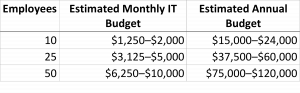
These estimates assume a comprehensive managed IT program that includes ongoing support, Microsoft 365 management, cybersecurity, and proactive maintenance.
Step 2: Know What’s Included
When comparing IT budgets, don’t focus on the monthly price alone.
Understand what’s included.
A comprehensive managed IT service typically covers:
- Unlimited help desk support
- Microsoft 365 administration
- Cybersecurity monitoring
- Patch management
- Backup monitoring
- Network management
- Remote support
- On-site support
- Strategic IT planning
A lower monthly price may exclude some of these services, leading to additional costs later.
Step 3: Plan for Hardware Replacement
Computers and other equipment have a limited lifespan.
As a general guideline:
- Desktop computers: 5–6 years
- Laptops: 4–5 years
- Servers: 5–7 years
- Network switches and firewalls: 5–7 years
Rather than replacing everything at once, consider a rolling replacement schedule.
For example, a 25-employee company might replace five or six computers each year, spreading costs more evenly and keeping equipment current.
Step 4: Budget for Cybersecurity
Cybersecurity is no longer optional.
Every IT budget should include investments in:
- Multi-Factor Authentication
- Endpoint protection
- Email security
- Security awareness training
- Backup and disaster recovery
- Security monitoring
These safeguards help reduce the risk of ransomware, phishing attacks, and business email compromise.
Step 5: Leave Room for Growth
Technology should support your business, not hold it back.
As your company grows, your IT budget should account for:
- Hiring new employees
- Opening additional offices
- Managing more properties
- Upgrading internet connectivity
- Expanding cloud services
- Adding mobile devices
Planning ahead makes growth smoother and reduces last-minute expenses.
Sample Budget: A 25-Employee Property Management Company
Let’s look at a realistic example.
A property management company with 25 employees wants predictable IT costs and stronger cybersecurity.
Their managed IT investment falls within the range of $3,125 to $5,000 per month, depending on service levels and licensing.
That investment typically includes:
- Unlimited technical support
- Microsoft 365 management
- Proactive monitoring
- Cybersecurity tools
- Backup and disaster recovery
- Remote and on-site support
- Quarterly technology reviews
Instead of budgeting separately for every IT issue, the company has one predictable monthly investment and a trusted technology partner.
Common IT Budget Mistakes
One of the biggest budgeting mistakes we see is focusing only on the monthly service fee.
Other common mistakes include:
- Delaying computer replacements until equipment fails
- Ignoring cybersecurity costs
- Buying software without planning for support
- Failing to budget for employee growth
- Comparing providers based only on price instead of what’s included
- Waiting until technology problems become emergencies
A thoughtful IT budget helps avoid these surprises.
Questions to Ask Before Approving Your IT Budget
Before finalizing your budget, ask:
- Does this include cybersecurity?
- Is Microsoft 365 management included?
- Are backups monitored and tested?
- How are after-hours emergencies handled?
- Are technology reviews included?
- What additional costs should we expect during the year?
Knowing the answers helps you compare providers fairly and avoid unexpected expenses.
Why Planning Beats Reacting
Businesses that budget proactively tend to experience:
- Fewer unexpected technology expenses
- Reduced downtime
- Better cybersecurity
- Longer equipment life
- Faster employee onboarding
- More predictable cash flow
Rather than reacting to problems as they arise, they’re investing in technology that supports the business every day.
Why Property Management Companies Choose Techwel
At Techwel, we work with businesses throughout the Edmonton Metro Area to build practical IT strategies that fit their goals and budget.
Our clients appreciate:
- Family-owned, relationship-focused service
- Every phone call answered by a real person
- Local remote and on-site support
- Microsoft 365 management expertise
- Proactive cybersecurity
- Predictable monthly managed IT services
We believe your IT budget should be easy to understand, aligned with your business objectives, and free of unpleasant surprises.
Ready to Build Your IT Budget?
Whether you’re planning next year’s technology budget, or wondering whether you’re investing the right amount today, we’re happy to help.
Techwel can review your current IT environment, identify opportunities to improve efficiency and security, and provide recommendations tailored to your business.
A well-planned IT budget isn’t just about controlling costs. It’s about giving your team the technology and support they need to serve your clients with confidence.
Book a discovery call with us: https://www.techwelcomputers.com/discoverycall/